When Linux was a Struggling Challenger
In 1999 I joined my first startup, Linuxcare in San Francisco. The Linuxcare story is a quintessential United States dot-com bubble narrative, featuring a famous venture capital fund, massive growth, a failed IPO, and a fancy new ex-IBM CEO resigning under a cloud. Founded in 1998, Linuxcare aimed to be the “0800 number for Linux”, a concept we now know was sound. So close!
As Samba co-founder I had practical experience in migrating away from Microsoft servers in corporate environments, and wrote the first how-to guide in English. I brought the document with me to Linuxcare, wanting to move the conversation from this is a possibility to the practical here is how to do it. Microsoft was extremely sensitive to documents like this, and downright allergic to the word ‘replace’. I found out years later this article was targetted for disinformation in key Microsoft accounts. This was a battle of narratives as well as monopolistic behaviour and technical facts.
More than a quarter of a century later, the technical content has aged fairly well. Many of the monopolistic facts remain much the same, which is slightly depressing. But some things were unimaginable in 1999:
- Samba both succeeded and failed but it (or something like it) may have another chance
- The EU is serious about alternatives
Exciting times! But not for Linuxcare, which had spectacular human failures and quietly collapsed from 300 staff to 3 within a couple of years.
The original of the following article is preserved at archive.org.

How to Replace Windows NT with Linux
by Dan Shearer (dan@linuxcare.com)
April 26, 2000
Table of Contents
- Introduction
- Linux Adoption is Nothing to be Afraid of
- How to Migrate
- A Migration Methodology
- Do it!
- Appendix - Protocol and Software Reference
- Glossary of Terms and Acronyms
1. Introduction
Most IT managers already understand the “why” of Linux and Open Source, and many are considering adopting Linux. Microsoft Windows NT network administrators are now facing a forced migration to Windows 2000. For many, however, a migration to Linux makes more sense. Careful planning is needed, however, in order to manage such a migration responsibly. How costly will such a migration be? How difficult? How time consuming?
This paper is about the “how” of Linux, concentrating on the challenges involved with migrating large and heterogeneous network environments. (If you need more on the “why” aspect, consult the papers and case studies at www.unix-vs-nt.org.) Replacing Windows NT is not always quick and easy (although it can be), but the return on a sound Linux investment is always worth the effort.
A methodology is presented here which will help you plan a migration that causes minimal disruption while providing maximum functionality. Microsoft has attempted to complicate these tasks by closing once-open technologies (“embrace and extend” is what they call it). All they have succeeded in doing, however, is providing network managers an even stronger incentive to adopt Linux. In this paper you will find pointers to tools that allow truly open standards to be gradually deployed in a mixed Linux/NT environment, making it a simple step, when the time is right, to eliminate Windows NT altogether.
2. Linux Adoption is Nothing to be Afraid of
Those who have been doing Microsoft or PC networking for a few years have probably experienced many previous migrations. Perhaps you have migrated your systems from Digital Pathworks or 3Com 3+Share to IBM/Microsoft LAN Manager, then later from LAN Manager to Windows NT 3.1 (if you were brave) or to Windows NT 3.51 (if you were not). Later, you possibly migrated to NT 4, and from there to every service pack. Most NT 4.0 service packs were, in effect, major system upgrades frequently resulting in unforseen difficulties and requiring careful testing and planning. If you started from a Netware or Banyan base and moved to NT, you had equally large headaches. Let’s not even talk about Apricot’s idea of networking. If you run Windows NT today then you are facing the spectre of an expensive and forced migration to Windows 2000.
Migrating to Linux is a task of equal scale. The need to train support staff, to test the new solution, to preserve data from previous sysstems, to transfer user accounts and check access permissions–all of these are the same. On the other hand, migrating to Linux is easier in many ways because reliable support is available. With Linux, “reliable support” means not only being able to get the help you need to solve your current problems, it also means that you are empowered to prevent such problems from happening again in the future.
Perhaps the most attractive thing about a migration to free and open source software is that the skills you pay to develop are actually a very solid investment. Every operating system supplier claims this, but think of it this way – what is all that expensive Windows NT training worth now that Windows 2000 is here? And was it you or Microsoft who decided when those skills would become obsolete? Linux skills remain applicable for as long as you choose to have software around, and there is rarely any need to upgrade more than a few components at any one time.
Windows 2000 forces you to a new directory scheme, a complete new suite of mail, Internet, and other servers, and also demands enormous hardware resources. What degree of pain will Windows 3000 impose? In comparison, Linux offers a very attractive migration path.
3. How to Migrate
If you are reading this document, you probably already know why you should migrate to a Linux-based system. It’s the “how” of doing such a migration that can often be overwhelming. Here are some quick tips to keeping the scope of the task to a manageable scale:
Don’t migrate everything at once. Frequently, the best way to handle a migration is to phase NT out of the server area first, then to later concentrate on the workstations. There are, of course, many other ways to divide the task into more palatable pieces. Some people pick classes of server applications (such as web, database, file/print) and address each of these in turn. Others choose to have a policy of maintaining dual environments on the desktop.
Avoid application development. It is always tempting to fix obviously bad programs during a migration. It is far better, however, to have multiple stages in a migration, between which you can address application issues. The key here is to avoid trying to do everything at once.
Linux does more, so use its capacities. Doing a cautious and well-planned migration doesn’t mean that you have to lose functionality. Linux can do things that are impossible with NT and other systems, and can also save you both time and money.
Use fewer, more open, protocols. The larger the number of protocols you use in your networks, the larger the network management overhead. While “open” can be difficult to define precisely, you can be fairly certain that if every part of a protocol is documented and there are free implementations available, then chances are that it’s open. If a protocol is described in one of the Internet RFC documents, that’s another good indication that the protocol is open.
4. A Migration Methodology
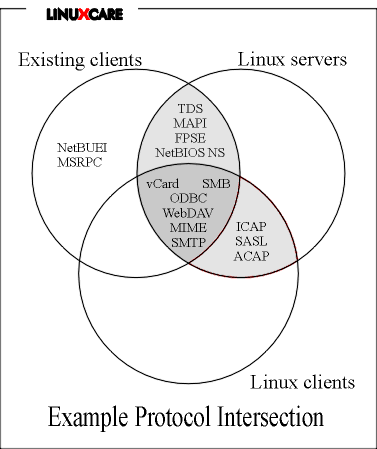
There are four steps you can follow to simplify a migration away from Windows NT. The first three of these steps show you how your data is currently being accessed, and also how this data can be accessed differently. The final step provides a Venn diagram illustrating possible deployment options.
The four steps are:
List your most important data stores, including those administered by users and those administered by network managers.
List the various client programs that are currently used to access these data stores.
List the protocols and APIs the client software uses when accessing these stores.
Prepare a “protocol intersection” diagram.
These steps are protocol and API driven, and will allow you to map a variety of migration paths from the “ideal path” to those which are restricted by various constraints (such as having to be able to run a particular Windows application). Once you know all the possible routes you can take, you will then be better able to select those which are most appropriate for you and your organization.
4.1. Identify Data Stores
4.1.1. User-Maintained Data Stores
Chances are that your users keep lots of data sources up-to-date. Some of these sources may be located on a workstation or a server, and some these are likely to be “unofficial”. If these data sources stop working, of course, you will be in trouble. Some examples of these sources are:
Email, often one of the most important business resources in a company. Email archives contain huge amounts of information, and users have probably put a lot of effort into using features of their mail clients, such as personal address books and mail filters. In what formats are these data sources stored? What mail servers and protocols are in use? What authentication methods are they using?
Calendaring and scheduling. Mail services are often bundled with collaborative scheduling systems (such as in a Microsoft Exchange environment), and these can be among the most challenging systems to migrate due to the lack of standards for these features.
File resources. Users often have huge amounts of data stored as collections of Microsoft Office documents on an NT or Netware server. Information stored in this fashion is often vital, but can difficult to search and migrate.
You might consider re-engineering large filestores like these (but not as part of your migration) Look at the structure of the documents. If extensive use has been made of Microsoft Office, WordPerfect, or other such templates, then it is quite likely that the same functionality can be delivered more reliably and cheaply using a Web forms interface to a database. In some cases, this can eliminate the need to have an office suite on the client systems, particularly those used by telephone sales or customer service staff.
Databases. On the server side, these include packages such as Oracle and Microsoft SQL Server, and on the client side, packages such as Microsoft Access, xBase, and more. The goal is to maintain the same interface for the users who keep these databases up-to-date, which is often a service that keeps the company running. A long-term strategy may be to move the interface to the Web, but in many cases the short-term answer is to retain the Windows client interface while re-engineering the protocol/API used to access the database itself.
Web servers. There are three kinds of web data to consider:
Raw content. Web site content maintainers need to know that their current content editing programs will still be usable after the migration is complete. This usually means that Windows programs such as FrontPage and PageMill must continue to work. What information is stored in these formats? How is this information accessed?
Dynamic content. Your Web developers also need to know whether their NT-specific scripts and applications will change. Often the answer is “no”, or “not much”. NT users of PHP and Perl should be almost completely insulated from changes. Sometimes, when complicated functionality is required (perhaps because business logic has been embedded in Microsoft ActiveX objects or other proprietary technologies) the same functionality can be emulated using standard open technologies. You will probably be able to split the functionality up and replicate the majority of it on Linux Web servers. The remaining functions can stay on NT systems until you have time to replace them with open solutions.
Dynamic content from other sources. Dynamic Web sites often pull their data from many sources, often in Microsoft-specific ways. List the data sources being used and the methods being used to access them.
4.1.2. Data Stores Maintained by Network Managers
The following are examples of data that might be maintained by your network or system administrators, including user and machine information. You will likely have more and different data sources than those presented here, particularly if you support many other operating systems on your network.
User database. This would include the name and full details for each network user, and their associated security properties. Windows NT servers store this information in one SAM database per domain.
Groups and permissions. This information is also stored in the SAM database, but is often replicated in supplementary databases because SAMs have a restricted set of fields relating to groups.
Computer and network database. Every computer has certain physical and network properties which need to be maintained in a central data store of some sort. Windows NT servers don’t tend to store this information at all except through unreliable NetBIOS names and per-machine SID numbers. Good Windows NT network administrators usually build custom databases in which they can more reliably store this machine-specific information, including IP addresses, physical locations, and other related data.
Backup archives. These will be maintained in some NT-specific format, frequently devised by third-party software vendor. The native Microsoft backup facilities aren’t very useful, so this third-party software is often necessary.
Server logs. Windows NT access logs are unwieldy, and are rarely authoritative in a multi-domain environment. If you want to migrate this functionality, you will be quickly and pleasantly surprised by the log-management tools that come with Linux.
4.2. List Current Client Software
While there is a huge range of client software available for Microsoft Windows workstations, there are actually fewer than 10 suppliers providing the majority of the applications used in large networks. Bundling arrangements with a few top-tier suppliers such as Microsoft, SAP, Lotus, and Oracle means that solving client migration problems with these vendors’ systems usually solves the majority of other client problems as well.
The lack of drop-in replacements for some client software (especially Microsoft clients) is not usually a problem. The protocols these clients use can be catered to by Linux servers, so a multi-stage migration interspersed with some client re-engineering usually provides a sufficient solution. In any case, few sites start by migrating client workstations to Linux immediately in order to delay training and other human resource issues.
The easiest way to start planning client system migration is to construct a table, such as the following, which addresses the specific requirements of your organization.
Microsoft Windows Client Software
| Product | Purpose | Can Use Linux Servers? | Functional Replacements | Linux Versions? | ||||
|---|---|---|---|---|---|---|---|---|
| MS Outlook Express (several concurrent versions exist with different feature sets | Individual and Shared Email, Scheduling | Yes | Many, including Lotus and Netscape | None | ||||
| Netscape Messenger | Individual and Shared | Yes | Any Internet-compliant Mail Client | Yes | ||||
| MS Frontpage | Publishing web pages, including image maps and CGIs | Yes | Very many | None | ||||
| MS Internet Explorer | Viewing Web Pages | Yes | Many | Not yet, but runs on other Unix platforms | ||||
| MS Office | Edit structured documents and spreadsheets | Yes | Several good existing and more announced | No | ||||
| Web-based Customer Relationship Managment package | Organisation-wide CRM tasks | Yes | Not an issue since it is web-based | Yes, any Linux web browser with Javascript such as Netscape or Opera | ||||
| In-house MS Access Database | Maintaining vital database kept on a file server | Yes, by several means | Many including Oracle, web front-ends and xBase but requires rewriting client | None | ||||
| In-house Oracle Client Program | Maintaining vital database kept on Oracle Server | Yes | As above; must rewrite client program | Announced | ||||
| Remote Windows Application Display | Dispalying screens from Windows NT, Terminal Server Edition | No | X Window remote application display | No |
4.3. List Protocols and APIs Used by Client Software
The following is an example of a list you might create when recording the protocols relevant to the Microsoft client software used within your system. Most networks will use most of the protocols shown below, but there may be a few used on your network that aren’t included here. When you’re not sure what protocols are being used by a particular system, you should use a network sniffer to identify them rather than relying on the product brochures.
The interesting thing about this list is that nearly all non-standard Microsoft technology is based either on something that already exists, or on something that is documented at a lower level. Microsoft’s “embrace and extend” policy is meant to eliminate competition, but it has also enabled and motivated teams of programmers to unscramble the Microsoft protocol extensions at roughly the same rate that Microsoft devises them.
What this means is that while you should make every effort to move networks entirely to open and standardised protocols that are not controlled by Microsoft, there are some excellent bridging solutions available which implement Microsoft’s proprietary protocols under Linux.
Not all of the protocols Microsoft uses are proprietary, of course. In many instances, the non-standard protocols are simply preferred by Microsoft clients when talking to Microsoft servers. These systems can often be easily reconfigured to use standard open protocols when necessary. Outlook Express is a classic example of this, in which IMAP is supported quite extensively, but the client is unable to connect to both an IMAP server and a native Exchange server at the same time, even if the Exchange server is running the IMAP service.
In the following table, “MSRPC” means Microsoft’s preferred method of communicating control data in NT networks: DCE/RPC over Named Pipes over SMB over NetBIOS. All of these acronyms are explained in the glossary, although for practical purposes how it works is irrelevant.
Similarly, “MSRDP” means Microsoft’s equally complicated way of sending screen images over a network, such as from Microsoft Windows NT Terminal Server Edition. This protocol is a proprietary variant of T.SHARE (ITU T.128), over the Multipoint Communications Service (MCS), over the ISO Data Transport Protocol, tunneled over TCP.
Protocols Preferred by Microsoft Products
| Purpose | Perferred Protocol/API | Documented | ||
|---|---|---|---|---|
| MS Outlook Express clients to talk to MS Exchange Server | MAPI streamed over MSRPC | Encrypted in an undoc way | ||
| Frontpage clients to talk to MS Internet Information Server | FrontPage Server Extensions | Undocumented | ||
| MS Internet Explorer Clients to talk to MS IIS | Extensions to HTTP and HTML | Undoc | ||
| MS Access clients to communicate with MS SQL Server | ODBC streamed over Tabular Data Stream (TDS) | Extended ODBC, TDS undoc | ||
| MS clients to talk to NT Servers for anything related to the SAM, authentication or administering NT services | Control requests via MSRPC | Undoc requests & undoc encrypt | ||
| MS File/Print clients to transfer files to any MS File/Print server | SMB (NT clients use MSRPC) | Partly doc | ||
| MS clients to locate MS server and clients | NetBIOS Name Server | Partly doc | ||
| Transport for previous three protocols | NetBEUI always preferred when present and possible | Doc, but a dying MS protocol. A free version has been released for Linux by Procon, but it is too early to predict what will happen with it | ||
| MS clients to link NetBIOS names and Internet names and addresses | WINS | Mostly doc | ||
| MS clients to access remote Windows screens | MSRDP | Built on existing standards with proprietary extensions |
Protocol Equivalents and Implementations
| Protocol | Free Implementation | Open Alternative | Comments | |||
|---|---|---|---|---|---|---|
| MAPI streamed over DCE/RPC for mail stores | No | IMAP mail access protocol and related standards | The Cyrus mail and related products suite at asg.web.cmu.edu are an excellent and scalable replacement for Microsoft Exchange | |||
| MAPI streamed over DCE/RPC for calendaring | No | ACAP Calendar access protocol and related standards | If you want to keep Outlook Express Calendaring and Scheduling you can use HP Openmail for Linux. | |||
| FrontPage Sever Extensions | Yes, by Mrs. Brisby, www.nim.org/fpse.shtml | WebDAV, www.webdav.org | FPSE is only needed with Microsoft FrontPage | |||
| MS Extensions to HTTP and HTML | No | Yes | Important bits implemented in browsers on Linux and Windows from Netscape, Opera and others. Users won’t miss SMB-in-HTTP | |||
| ODBC streamed over TDS | Yes, www.freetds.org | Seems to be a general lack of standards | Better to use ODBC over a truly open transport. | |||
| NT Control requests over DCE/RPC | Yes, in Samba | SNMP, which has numerous Linux implementations, Also a large range of web control tools | Undoc requests & undoc encryption - a truly horrible protocol | |||
| MS File/Print clients to transfer files to any MS File/Print server | Yes, in Samba (server) and smbfs/smbclient (clients) | Partly doc. A solved problem | ||||
| MS clients to locate MS server and clients | NetBIOS Name Server in Samba | Internet standard Resource Location Protocol, or alternatively LDAP | Only partly doc, but well-implemented in Samba anyway | |||
| Transport for previous three protocols | NetBEUI always preferred when present and possible | Doc, but a dying MS protocol. Even Microsoft doesn’t recommend it. | As of March 2000 there is a free Linux implementation from www.procom.com | |||
| MS clients to link NetBIOS names and Internet names and addresses | Samba WINS server | Use DNS instead! | Mostly doc |
4.4. Draw a Protocol Intersection Diagram
Using the tables that you have drawn up in the previous steps, you should be able to list the following (see the Protocols and Software Reference for more information):
The set of protocols/APIs that can be used to make the existing client software talk to servers (whether currently in use or not).
The set of protocols that free server software can use to serve the existing data stores.
The set of protocols free client software can use to access information from the data stores.
A Sample Protocol Intersection Diagram
5. Do it!
Once you understand where your data is and how it can be accessed, you will be able to draw up a feasible multi-stage migration plan. This is always highly specific from site to site, but if you follow the tips given earlier in this paper you will be able to design a staged migration based upon more open and standardised protocols.
After this point, however, the migration is up to you and will depend heavily on your knowledge of the network. Which parts of your infrastructure can be most easily migrated? It may be the file servers or perhaps the Oracle databases. Are there some performance bottlenecks that Linux can solve for you? If so, perhaps these are the first areas you should address.
6. Appendix - Protocol and Software Reference
Many of the software packages in this reference run on most kinds of Unix, as well as on Linux, without modification. Where you see “Unix” in the following table, you should therefore include “Linux” as well.
The acronyms in this section are explained in the Glossary.
6.1. File Serving
| Protocol | Software | |
|---|---|---|
| Microsoft: | ||
| SMB suite | Windows 95, 98, Samba on Unix and others, print servers, Netapp filers et al | |
| SMB+NT extensions | Windows NT, Windows 2000, Samba on Unix and others | |
| Novell: | ||
| IPX/SPX suite | Novell Netware, mars_nwe under Linux | |
| Unix: | ||
| NFS | nfsd - standard with any Unix | |
| AFS | Andrew Filesystem - free distributed filesystem for Unix | |
| Coda | free distributed filesystem with mobile synchronisation | |
| FTP | Servers available for any Internet-capable operating system | |
| Apple: | ||
| Appleshare | Apple file server from Apple, netatalk for any Unix |
The Microsoft model of networking encourages use of file sharing rather than application sharing. That is to say that every workstation has a complete copy of an application binary stored locally while data is stored on servers. This is the most common use for NT servers. Microsoft Windows Workstations are often also used similarly with Novell Netware. If this describes your situation, then you would do well to think about accessing the same data via the Web.
Linux is able to serve files over all of these protocols. If required, Linux can serve files over all of them simultaneously. Configured properly, Samba running on Linux is able to perform as an SMB server at least as well as Windows NT. On large installations (ie on hardware more powerful than anything Windows NT can run on) Samba happily handles hundreds of thousands of simultaneous SMB clients.
Few of these protocols are suitable for general Internet use due to timing and resource location issues. Currently, there is no widely-adopted file access protocol with is simultaneously secure, able to operate between physically distant machines, and easy to integrate into modern authentication architectures.
6.1.1. Migration Comments
In some cases, a simple redesign of your application structure may allow you to dispense with file sharing. For example, making data accessible via the Web rather than through proprietary Microsoft Office files. Regardless, however, duplicating Windows NT shared file resouces on Linux is trivial. The challenge lies in getting the authentication systems right, as discussed below. The PAM authentication system allows a very flexible migration strategy to be adopted, independent of whether the authentication database is an NT domain, an NIS domain, an LDAP server, or a custom SQL database.
6.2. Client-side Filesystems
| Protocol | Software | |
|---|---|---|
| Linux: | ||
| NFS | Standard with Linux (mount -t nfs) | |
| SMB | Standard with Linux (mount -t smbfs) | |
| IPX | Standard (mount -t ncpfs) and enhanced client from Caldera | |
| Coda | Standard with Linux (mount -t coda) | |
| Apple | Free add-on to Linux (mount -t afpfs) | |
| Microsoft: | ||
| SMB | Comes with Windows 95, 98, NT, 2000 | |
| IPX | Comes with Windows 95, 98, NT, 2000, not as functional as SMB | |
| NFS | Third-party addons, but no really good ones. Ignore them | |
| Coda | Free addon, but not widely known or tested |
While Microsoft has failed to dominate the LAN server market, it has also successfully avoided including any protocol other than SMB on its client operating systems. Microsoft has accomplished this by keeping the development information required to write a successful client filesystem a proprietary secret, available only if you purchase a software development kit under non-disclosure terms. Samba, however, has made it unnecessary to reverse-engineer any of the programming interfaces involved, because Samba allows almost everything to be done on the server side.
By locking out serious client-side filesystem competiton, Microsoft has forced Windows users to forego the advantages of modern filesystems. Fast, secure, and intelligent distributed filesystems exist, but Windows users cannot expect to be able to use these any time soon.
6.2.1. Migration Comments
It is common to keep existing Microsoft Windows clients unchanged during the first stages of a migration. It is also common to keep using these clients with traditional file stores, even though it might be better to use the Web instead (see comments under “File Serving”). If this is the case in your migration strategy, you should be using SMB. Samba, the free SMB implementation, is extremely capable and robust, and has a large and dedicated development team. Microsoft Windows clients are also better integrated with SMB (and therefore Samba) than they are with Novell IPX (or mars_nwe). While NFS can be made to work with Windows clients, it is a very poor and insecure system, and isn’t really worth the effort required to implement it.
Using Samba, it is possible to pass some of the benefits of modern networked filesystems on to the Windows clients. Pay careful attention to locking issues, however, when using Samba as a gateway in this fashion. Read-only access does not present any locking issues (such as sharing CD ROMs, or sharing a network filesystem via a web server) but in any read-write situation there is potential for serious locking problems to arise.
6.3. Printing Services
| Protocol | Software | |
|---|---|---|
| Servers: | ||
| lpr | Any Unix, Windows NT, Novell, many others | |
| SMB | Samba on Unix and others, Windows NT | |
| IPX | mars_nwe on Linux, Netware, Windows NT | |
| Clients: | ||
| SMB | Samba on Unix and others, Windows 95 and Windows 98 | |
| lpr | Any Unix, Apple, Windows NT Workstation | |
| IPX | Netware clients |
The only major platforms that cannot use the Unix lpr printing protocol natively are 16-bit Windows 95 and Windows 98. Third-party addon software is available for these operating systems.
6.3.1. Migration Comments
A common solution is to move to using lpr throughout an organisation except where 16-bit clients are concerned. These 16-bit clients, can be served from Samba. If each client has to be reconfigured for other reasons anyway, however, then an lpr solution should be used on 16-bit Windows systems as well in order to reduce the number of protocols being used.
When dealing with Windows NT clients, it is just as easy to connect to printers via lpr as via SMB. This being the case, you may choose lpr in preference to SMB to avoid an extra layer of complication in your network. It is sometimes better, however, to send all Windows client printing through Samba so you are able to later make changes that affect only the Windows printer users. It is more difficult to isolate the Windows users if they are all using lpr directly.
6.4. Email Services
In the following, “All major client software” means Netscape Messenger, Microsoft Outlook Express, mutt, pine, Lotus Notes cc:Mail, Pegasus, Qualcomm Eudora and others of similar sophistication.
| Protocol | Software | |
|---|---|---|
| Servers: | ||
| SMTP | Any mail transport on Unix and most on Windows NT and other operating systems. SMTP is more flexibly implemented on Unix than any other platform | |
| RFC822 & MIME | These mail encoding and formatting standards are supported by any Internet-compliant mail transport and reading software | |
| IMAP | Cyres imapd (free), uWashington impafd (free), Microsoft Exchange, many others | |
| POP | An ancient but still widely-used protocol. Useful in organisations without a well-planned email strategy, where amil folders tend to be store on local hard discs (probably not backed up either!) | |
| MAPI (over MSRPC) | Microsoft Exchange, HP Openmail | |
| HTTP | Many mail store servers have a web interface. Microsoft Exchange has one, as has Lotus Notes and others. On Unix a component apporach is preferred, and there are many web interfaces to IMAP servers available | |
| LDAP | Mailing lists, accounts and mail permissions ought to be sotred in an LDAP database. Exim, qmail, Sendmail and others on Unix, Netscape Mail Serveron all platforms, other | |
| Clients: | ||
| IMAP | All major client software | |
| MAPI | Most Windows clients, including Microsoft, Lotus, Pegasus and Netscape. No Unix clients because it is a Windows-only API | |
| SMTP | Just about all clients on all platforms. SMTP is the only Internet-standard way of submitting email. There are secure versions of it. Microsoft Outlook clients ca do SMTP but prefer the strange MSRPC format where available | |
| HTML | All major client software can handle messages encoded in HTML, however plain text is always the best option for message body text. If you want a structured document format enclose it was an attachment r put it on the web and email the url | |
| RTF | This Microsoft Word Processing format is supported natively by Microsoft Outlook, and by external viewers in other mailers. It is a very bad ide to have enabled in any context. Disable it. | |
| RFC822 & MIME | All major clients software. However there are many MIME RFCs to do with internationalisation, security, large files and more. Microsoft do not try to provide a complete implementation, which is difficult for some Asian and European languages and anyone who wants secure email. | |
| LDAP | Star Office mail, Netscape Communicator, Pegasus. Not the counterpart of LDAP in a mail server. LDAP on a client should be used for things like addressbooks. |
6.4.1. Migration Comments
Any large deployment of mail servers has to be customised to fit the site. Commercial software always seems to make this level of customisation difficult or impossible, and as a result, free software tends to be much better for the server side of things. On the other hand, commercial software currently fares better on the client side. Some commercial clients, such as Mulberry, are outstanding for their standards compliance. There are, of course, some equally good free client alternatives.
The most scalable and flexible Linux-based IMAP mail store solution is the free Cyrus mail server. There are many choices available for the mail transport component, including Sendmail, Exim, Qmail, and others. With software like this, along with the SASL authentication mechanism, the ACAP client configuration protocol, and LDAP, it is possible to build an extremely powerful enterprise system using only free software components. The client software can still be Windows or Macintosh Eudora, Outlook Express, Netscape Communicator, or any of dozens of other available client systems.
Moving away from Microsoft Exchange is trivial from an email point of view because Microsoft Outlook Express clients are also capable of using the IMAP protocol. You can experiment with this by switching your Exchange server to IMAP-only and changing the configuration of your Outlook Express clients. Once this works, you can implement a Linux-based IMAP server without your users ever noticing the difference.
If you use Lotus Domino or Netscape Mail Server, there have been recent announcements regarding the availability of this software for Linux platforms. The simplest route for this part of your migration may be simply to transfer your existing software license to a Linux version of the same software when the product is made available.
The calendaring and scheduling functions of Exchange, Domino, and Netscape Calendar Server are dealt with in the next section.
One of the tricky things about migrating IMAP servers is moving mail and setting permissions for thousands of mailboxes at a time. One of the best things to do is use the Perldap library. Sample code has been posted to Cyrus forums for doing this, including with web interfaces.
6.5. Calendaring and Scheduling
Calendaring is a strange area. Most products support most of the standard protocols, but interoperability between clients and servers from different vendors is still very poor. No calendar access protocol yet exists, which is mostly because of the intertia behind the commercial calendaring systems and their proprietary protocols (Microsoft and Lotus are both major players in the IETF standards committee). Internet standards in this area have only recently been finalised, and at this time only free software implements calendaring that is in compliance with the few standards and standards drafts that currently exist.
Cybling Systems has a project to attempt to untangle these issues at http://www.cyblings.on.ca/projects/calendar.
| Protocol/format | Software | |
|---|---|---|
| Servers | ||
| MAPI over a transport | MS Exchange, HP Openmail. Not a published standard | |
| Other proprietary | Calendar servers with Star Office, Netscape Suite Spot, Corporate Time and others | |
| Web-based access | All major | |
| iCalendar, vCalendar | All major, except Microsoft | |
| vCard | All major, except Microsoft | |
| SMTP | All major | |
| ICAP | Anything using the MCAL (Modular Calendar Access Library) library, such as www.bizcheck.com. PHP and GTK+ applications exist. This is not an Internet standard and the draft has expired | |
| CAL | The official direction of the ISO and IETF bodies for calendaring standards. No product anywhere implements this Internet draft | |
| LDAP | ||
| Clients | ||
| MAPI over a transport | MS Schedule+, MS Outlook Express | |
| Other proprietary | All clients, due to lack of calendar access standard | |
| vCard | Most major | |
| SMTP | Some minor | |
| LDAP | Netscape, StarOffice, other minor |
The paper at http://www-me1.netscape.com/calendar/v3.5/whitepaper/index.html summarises a vendor’s view of Internet calendaring standards (provided the vendor is not one of the two who have millions of existing proprietary clients and the ability to stall the standards process!)
The best that any calendar software implementor can do at the moment is implement the following protocols: iCalendar, vCalendar, vCard, SMTP (for e-mail notification), LDAP (for details of all users, groups and items that can be scheduled) and X.500 (in very large corporate environments). This will change as soon as the ICAP Calendar Access Protocol or its equivalent becomes an Internet standard.
6.5.1. Migration Comments
If at all possible, you should use a Web-based calendar client with a server that supports as many Internet standards as possible. If you must use Microsoft Outlook Express, then HP Openmail is the only non-Microsoft option available. The calendar servers from the Star Office and Netscape Suite Spot server suites can provide good interim solutions in many situations. The Corporate Time calendaring product is an example of a calendaring system that uses all the available standards (see http://www.cst.ca). There are other examples, but for the moment the area is fraught with difficulty.
6.6. Web Servers
The Apache Web server is free software that is currently used on over 55% of Web sites on the Internet, with Microsoft IIS being used on 24%. Reliable data is hard to find for Intranet deployments, but it seems likely that Microsoft is being used on a higher percentage of Intranet servers.
Web publishing is best done using the standard WebDAV protocol (http://www.webdav.org/other/faq.html), but the widely-used Microsoft FrontPage packages use the undocumented Front Page Server Extensions protocol. Both of these are implemented on Linux.
| Protocol/API | Software | |
|---|---|---|
| HTTP v 1.1 | All major | |
| ISAPI prog. interface | All major | |
| ASP scripting | IIS, Apache | |
| PHP scripting | Apache, IIS others | |
| Data interfaces eg ODBC | Apache, IIS, others | |
| FrontPage Extensions | Apache (via http://www.nimh.org/fpse.shtml | |
| WebDAV (open FPSE) | Apache, Netscape |
6.6.1. Migration Comments
Microsoft is not dominant in the Web server market, so there are not nearly as many difficulties in migrating to a non-NT system. Administrators should find Apache easier to configure and run for large and mission-critical sites.
One of the big issues involved when migrating away from Microsoft IIS servers is the use of Active Server Pages (ASP). If the language used for ASP is Perl rather than Visual Basic then there should be minimal difficulties (see http://www.on-luebeck.de/doku/asp/).
A migration to Linux usually includes replacing IIS with Apache. You can start this aspect of the migration by running Apache on a Windows NT server if there are OS-specific integration issues that require more time to solve.
There are other free Web server solutions available for Linux, including Roxen (http://www.roxen.com), that have particular strengths used for electronic commerce and in a couple of other specific areas. Zeus (http://www.zeus.co.uk) is a commercial Web server available for Linux which is quickly increasing its market share (see the surveys available at http://www.netcraft.co.uk).
6.7. Database Servers
The Linux database server market is booming. Microsoft is currently the only major vendor who has not produced a closed-source Linux version of their database offering. PostgreSQL and MySQL are the leading free software contenders.
Most database servers are accessible via the ODBC API which packages SQL calls. Differences arise as to how ODBC calls are transported, which is where ODBC “bridges” come in to the picture. ODBC bridges obviate the need for common protocols, albeit in a rather clumsy fashion.
There isn’t much to discuss in the way of protocols, except that Sybase and Microsoft SQLServer use a partially-undocumented Sybase protocol called TDS when communicating ODBC queries. Microsoft has extended this protocol in even more undocumented ways, but a free implementation does exist (see http:/www.freetds.org). This is important only because Microsoft Access uses TDS by default when communicating with SQLServer.
6.7.1. Migration Comments
If you can eliminate TDS from your network, you will reduce the overall complexity of your database system.
If you have an NT data source that you want to be able to access from Linux, the ODBC Socket Server (http://odbc.linuxbox.com) will allow you to do this.
Note that it is important to get the Primary Key Definition right when making ODBC calls to non-Microsoft databases from Microsoft Access.
6.8. Firewalls, Gateways, DNS and other Basic Internet Services
This is one area where Microsoft has made relatively little headway in corrupting Internet standards. Microsoft has produced variants of DHCP, PPP, and numerous other “glue” protocols, but remains a minor player in the network management layer. As such, Microsoft is unable to influence the market at the expense of open Internet standards.
If you are running any of these services on a Windows NT machine, then you are putting yourself at risk. Windows NT simply is not able to provide any verifiable degree of security when operating as a firewall due to Microsoft refusing to allow peer review of their code. For the same reason, even if the Microsoft DNS server wasn’t already famous for being unreliable, there have been enough security holes identified in the free open-source DNS server implementation to warn anyone away from relying on a very young, closed-source implementation.
6.9. Things Not Covered in this Paper
Windows source code migration. If you are fortunate enough to have the Windows source code to applications that you wish to run on Linux then there is a great deal that can be done to make this as simple as possible without requiring a code rewrite. This will be the subject of another Linuxcare paper!
Authentication systems, Linux PAM and mixed authentication environments. With a combination of PAM on Linux and Unix systems and LDAP as the master authentication database it is possible to authenticate against every likely protocols. Samba can authenticate Windows clients using PAM to talk to LDAP, RADIUS dialup authentication servers can do the same, as can any other service which runs on Linux. There is also an LDAP schema which supplies all required NIS+ information so that LDAP becomes a true distributed directory service. This is a whole paper on its own!
The Service Location Protocol (RFC2608). This is for locating services of any kind on an Intranet, with defined mappings to LDAP and other standard repositories.
Database application migration to free Linux databases. Recent work by the Postgresql team means that PostgreSQL can now deliver all the functionality of large commercial databases such as Oracle.
Email address book formats and access mechanisms, especially relating to ACAP and LDAP.
Extent of the Calendaring and Scheduling protocol mess, and recent positive signs.
7. Glossary of Terms and Acronyms
ACAP
Application Configuration Access Protocol, a protocol being developed by the IETF. ACAP supports IMAP4-related services. http://asg.web.cmu.edu/acap/
AFS
Andrew File System, an old but innovative distributed filesystem. See the FAQ at http://www.angelfire.com/hi/plutonic/afs-faq.html. Modern replacements exist, such as Intermezzo by Linuxcare employee Phil Schwan.
Apache
An Open Source Web server developed by the Apache Group, a large group of open source developers from many companies including Linuxcare (Martin Poole and Rasmus Lerdorf.) According to recent surveys, it is estimated that Apache is used on approximately 58% of servers on the Web. You can get more information about Apache and the Apache Group at http://www.apache.org.
API
Application Program(ming) Interface, a set of routines, protocols, and tools for developing software applications.
ASP
Active Server Pages, a Microsoft specification for creating dynamically-generated Web pages that utilizes Microsoft Active X components, usually via Microsoft VBScript or Perl.
CAP
Calendar Access Protocol Internet Draft draft-ietf-calsch-cap. See http://www.imc.org/ids.html#calsch.
CGI
Common Gateway Interface, a specification for transferring data between a Web server and a CGI program. A CGI program is any program designed to accept and return data that conforms to the CGI specification. CGI programs can be written in any number of programming languages, including C, Perl, or Java. For more information about CGI, see http://www.w3.org/CGI/.
Coda
A free distributed filesystem intended to solve the problem of disconnected filesystems (eg wandering laptops.) Replaced by Intermezzo.
Corporate Time
Example of commercial corporate scheduling packages that tries to be as standards-compliant as possible. http://www.cst.ca/
CRM
Customer Resources Management. A buzz-word for software that manages a database of all information to do with potential, existing and past customers.
Cyrus mail server
An extremely robust and scaleable free email storage server. Tends to cooperate with the leading implementation of new standards including SASL, ACAP and Sieve.
DCE
Distributed Computing Environment, a suite of technology services developed by The Open Group (http://www.opengroup.org) for creating distributed applications that run on different platforms.
DHCP
Dynamic Host Configuration Protocol, a protocol for assigning dynamic IP addresses to devices on a network. For more information see RFC1531 (ftp://ftp.isi.edu/in-notes/rfc1531.txt).
DNS
Domain Name Service, an Internet service that translates domain names into IP addresses.
Eudora
A popular commercial, closed source email client developed by Qualcomm, Inc. For more information see http://www.eudora.com.
Exim
One of the leading free mail transport programs. http://www.exim.org.
FPSE
Front Page Server Extensions, an undocumented method invented by Microsoft for having web publishing software write to a web server. Completely replaced by the Internet DAV standard.
FTP
File Transfer Protocol, a standard internet protocol used for sending files. For more information, see RFC959 (ftp://ftp.isi.edu/in-notes/rfc959.txt). FTP is still the only Internet-wide file-specific transfer protocol, after more than 20 years.
GTK+
Gimp ToolKit, a small and efficient widget set for building graphical applications.
HP OpenMail
Hewlett Packard’s answer to Microsoft exchange. By simply replacing the file MAPI.DLL on the client workstations OpenMail can be used as a server for Microsoft Outlook Express clients including calendaring and scheduling. The replacement MAPI.DLL does not communicate with the OpenMail server using MSRPC. http://openmail.hp.com
HTML
Hypertext Markup Language, the main language used to create documents on the Web. For more information see http://www.w3.org/MarkUp/.
HTTP
Hypertext Transfer Protocol, the underlying protocol used on the Web, defining how messages are formatted and transmitted, and how servers and browsers should respond to various commands. For more information see RFC2616 (ftp://ftp.isi.edu/in-notes/rfc2616.txt).
iCAL
Internet calendar formal public identifier. http://www.imc.org/draft-ietf-calsch-icalfpi See http://www.imc.org/ids.html#calsch
iCalendar
see iCAL
ICAP
Internet Calendar Access Protocol. See the www.imc.org url above
IETF
Internet Engineering Task Force http://www.ietf.org
IIS
Internet Information Server, Microsoft’s closed-source Web server that runs on Windows NT. According to the latest figures from Netcraft http://www.netcraft.co.uk, IIS’ market share is dropping each month.
IMAP
Internet Message Access Protocol, a protocol used for retrieving email messages. For more information see RFC2060 (ftp://ftp.isi.edu/in-notes/rfc2060.txt).
imapd
Generic name for a daemon, or server process, use to handle IMAP connections.
Intermezzo
A distributed file system with a focus on high availability. The principal developer is Phil Schwan, from Linuxcare. For more information see http://www.inter-mezzo.org.
IPX
Internetwork Packet Exchange, an undocumented and closed-source networking protocol used by Novell Netware operating systems.
ISAPI
Internet Server Application Program Interface, an API developed by Microsoft for it’s IIS Web server. Some other Web servers support ISAPI.
ISO
International Organization for Standardization, an organization composed of national standards bodies from over 75 countries. For more information about the ISO, see http://www.iso.ch/welcome.html. ISO standard typically take years longer to develop than Internet standards. The ISO standards for computer protocols were completely superseded by Internet standards.
ITU
International Telecommunication Union, an intergovernmental organization through which public and private organization develop telecommunications systems. The ITU is a United Nations agency responsible for adopting international treaties, regulations, and standards governing telecommunciations. For more information about the ITU, see http://www.itu.int/.
ITU T.128
T.128 is the Internation Telecommunication Union’s recommendation regarding Multipoint Application Sharing. For more information, see http://www.itu.int/. No open source implementations and closed-source implementations do not have a good record for interoperability. Use the X Window system instead!
LAN
Local Area Network, a computer network that spans a relatively small physical area.
LDAP
Lightweight Directory Access Protocol, a set of protocols devised for accessing information directories. LDAP is based on the standards contained within the X.500 standard, but is significantly simpler. LDAP supports TCP/IP, which is necessary for any type of Internet access. For more information, see RFC2251, RFC2252, RFC2253, and RFC2589.
lpr
The Unix Line PRinter protocol. Ubiquitous protocol for transferring print jobs around a network.
MAPI
Message Application Programming Interface, a system that enables Microsoft Windows’ email applications to communicate for distributing mail. This API is only relevant to Windows machines.
mars_nwe
Open source clone of the most functional parts of Novell Netware, usually run on Linux.
MCAL
Modular Calendar Access Library. http://mcal.chek.com.
MIME
Multipurpose Internet Mail Extensions, a specification for formatting non-ASCII messages so they can be sent over the Internet. Many email clients support MIME, enabling them to send and receive graphics, audio, video, and other different file types. There are many, many MIME-related RFCs (see http://www.imc.org for more information.)
**MSRPC **
Microsoft’s preferred method of communicating control data in NT networks: DCE/RPC over Named Pipes over SMB over NetBIOS. The only open implementation of this is by Luke Leighton of Linuxcare, whose work can be seen in Samba and is explained in his book “Samba and Windows NT Domain Internals” available from MacMillan Technical Publishing.
Mulberry
Mulberry is a closed-source email client for Microsoft Windows or Apple Macintosh platforms with a Linux version in beta as of January 2000. For more information see http://www.cyrusoft.com/mulberry/mulbinfo.html. Mulberry is remarkable for its excellent implementation of Internet standards, including new ones such as ACAP. In contrast, applications such as Microsoft Outlook Express and Netscape Communicator frequently implement standards poorly, making more work for administrators and in some cases penalising the end-user.
MySQL
MySQL is a multi-user, multi-threaded SQL database server. MySQL is a client/server implementation that consists of a server daemon “mysqld” and many different client programs and libraries. For more information, see http://www.mysql.org. MySQL and PostgreSQL between them are the most popular open source databases. MySQL is the lighterweight of the two.
NetBEUI
NetBIOS Enhanced User Interface, an enhanced version of the NetBIOS protocol used by network operating systems such as LAN Manager, LAN Server, Windows for Workgroups, Windows 95/98, and Windows NT. Documentation is now available but most regard it as a dead protocol. However it is the best SMB transport protocol for the millions of DOS machines still in use and free closed-source NetBEUI stacks for DOS are available for download from IBM and Microsoft. A free Linux version ready for use with Samba was made available in March 2000 at www.procom.com as this paper was being completed.
NetBIOS
Network Basic Input Output System, an application programming interface that augments the DOS BIOS by adding special functions for local area networks. NetBIOS over TCP/IP is defined in RFC1001 and RFC1002. This is a very poor protocol, implemented in several open source products including Samba (www.samba.org) and derivatives.
Netcraft
Netcraft is an internet consultancy based in Bath, England. The majority of its work is closely related to the development of internet services. Netcraft is most famous for its website which is devoted to surveying Internet technologies. For more information, see http://www.netcraft.com.
NFS
Network File System, an open system designed by Sun that allows all network users to access shared files stored on different platforms. NSF provides access to shared files through the Virtual File System that runs via TCP/IP. NFS is demonstrably a poor choice for running on Windows-based PCs, due to the bad design of Windows.
nfsd
Generic name for a daemon, or server process, use to handle Network File System connections. Think of it as the Samba equivalent for the NFS protocol.
NIS
Network Information Server, a Unix directory system for distributing system configuration data such as user and host names between computers on a network. Can be linked to an LDAP database transparently to the client systems, see www.padl.com.
ODBC
Open DataBase Connectivity, a database access method developed by Microsoft and widely implemented. ODBC is an API not a protocol.
PAM
Pluggable Authentication Modules, a general infrastructure for module-based authentication. For more information, see the Linux-PAM pages at http://www.kernel.org/pub/linux/libs/pam/.
Pegasus
A very popular closed-source email client for Windows and Macintosh platforms, available free of charge from New Zealand-based Pegasus Computing. For more information, see http://www.pegasus.usa.com/.
Perl
Practical Extraction and Report Language, a programming language originally developed by Larry Wall, now maintained by an extensive team of Open Source developers. Perl is one of the most popular languages for writing CGI scripts. For more information, see http://www.perl.org.
perldap library PerLDAP, or Perl-LDAP, is a combination of an interface to the C SDK API and a set of object oriented Perl classes. For more information, see http://www.mozilla.org/directory/faq/perldap-faq.html.
PHP
PHP Hypertext Preprocessor, a web scripting language that is an alternative to Microsoft’s Active Server Pages (ASP). PHP runs on Linux, Windows, and many other platforms. The principal author is Rasmus Lerdorf of Linuxcare. For more information, see http://www.php.net.
POP
Post Office Protocol, a protocol used to retrieve email from a mail server. Most email clients support this protocol. For more information see RFC1939 (ftp://ftp.isi.edu/in-notes/rfc1939.txt).
PostgreSQL
PostgreSQL is a object-relational database management system supporting almost all SQL constructs. For more information, see http://www.postgresql.org. See also MySQL.
PPP
Point-to-Point Protocol, a method for connecting a computer to the Internet. For more information see RFC1661 (ftp://ftp.isi.edu/in-notes/rfc1661.txt).
qmail
Like Exim, Qmail is an open source replacement for sendmail, written by Dan Bernstein. For more information, see http://cr.yp.to/qmail.html.
RFC
Request For Comments. For more information, see http://www.rfc-editor.org.
RFC822
Standard for ARPA Internet Text Messages (Aug 13, 1982). This defines the basic format of Internet email messages, for example, it says that every message should have a Subject: and Date: header.
RPC
Remote Procedure Calls, a protocol that allows for a program on one computer to execute a program on a server. Using RPC, a system developer does not need to develop specific procedures for the server–the client program sends a message to the server, and the server returns the results of the executed program. For more information, see RFC1831 (ftp://ftp.isi.edu/in-notes/rfc1831.txt).
Roxen
Roxen is a line of Internet server products, the core of which is the Roxen Challenger Web server. Roxen is free software distributed under the GNU General Public License and is distributed with a robust IMAP module. For more information, see http://www.roxen.com.
RTF
Rich Text Format, a Microsoft-devised method for formatting documents. The specifications are available but very complex. Fine details of documents (such as table alignment) are often confused in translations. Use XML instead wherever possible.
SAM
The Windows NT Security Account Manager. A database of undocumented format which stores usernames, passwords and other information equivalent to a NIS or LDAP database in the free world. A SAM access tool has been produced by the Samba team which extracts usernames and passwords from the SAM for the purposes of migrating away from NT to Samba.
Samba
Samba is an open source software suite that provides file and print services to SMB (otherwise known as CIFS) clients. The principal author is Andrew Tridgell of Linuxcare who is now assisted by a multinational team of open source developers. Samba is the only SMB server apart from Windows NT that has large market share. Samba is freely available under the GNU General Public License. For more information, see http://www.samba.org.
SAP
The US brach of SAP AG, the second-largest software company in the world, based in Germany. Their closed-source Enterprise Resource Planning package is very popular, and runs on Linux.
SASL authentication
Single ASsignment Language, a functional programming language designed by Professor David Turner in 1976.
Sendmail
Sendmail is an open source Mail Transfer Agent distributed under the Sendmail License. For more information, see http://www.sendmail.org. Sendmail is an ancient program responsible for delivering perhaps 70% of all email on the Internet. Modern replacements include Exim and qmail (q.v.)
SID
Windows NT Security IDentifier.
SMB
Server Message Block, a message format used by DOS and Windows operating systems to share file, directories, and services. A number of products exist that allow non-Microsoft systems to use SMB. Samba is such a system, enabling Unix and Linux systems to communicate with Windows machines and other clients to share directories and files. The SMB protocol is undocumented and has many bad design features. It is effectively monopolised by Microsoft, although there is a public CIFS group.
SMTP
Simple Mail Transfer Protocol, the Internet protocol used for sending email messages between servers. SMTP is generally used to send mail from a client to a server. This is the most important protocol on the Internet.
SNMP
Simple Network Management Protocol, a set of protocols used for managing complex networks. SNMP works by sending “protocol data units” (PDUs) to different parts of the network where SNMP-compliant “agents” store data about themselves in “Management Information Bases” (MIBs).
SPX
Sequenced Packet Exchange, an undocumented transport layer protocol used in Novell Netware networks. SPX sits on top of the IPX layer and provides connection-oriented services between two nodes on the network. Like IPX and SMB (q.v.) this protocol should be avoided wherever possible however there are open source implementations.
SQL
Structured Query Language, a standardized query language for requesting information from a database.
Star Office
Star Office is a suite of office applications, freely available through Sun Microsystems. For more information, see http://www.sun.com/staroffice/. All support for Star Office is free, and handled by Linuxcare.
Sybase
One of the dominant software companies in the area of database management systems and client/server programming environments. Microsoft SQL Server is based on Sybase, which is why Sybase and SQLServer both use the undocumented TDS protocol. www.freetds.org.
TCP
Transmission Control Protocol, one of the main protocols used in TCP/IP networks. TCP enables two hosts to establish a connection and exchange streams of data, guaranteeing the delivery of the packets in the correct order.
TCP/IP
Transmission Control Protocol/Internet Protocol, a suite of communications protocols used to enable communication between computers. TCP/IP is the defacto standard for transmitting data over networks.
TDS
Tabular DataStream, a protocol used by Sybase and Microsoft for client to database server communications. A free implementation of TDS is being developed (http://www.freetds.org).
URL
Uniform Resource Locator, the global address of resources available via the Web.
WebDAV
WebDAV is a protocol that defines the HTTP extensions necessary to enable distributed web authoring tools to be broadly interoperable while supporting the users needs. In this respect, DAV is completing the original vision of the Web as a writable, collaborative medium. For more information, see http://www.webdav.org.
WINS
Windows Internet Naming server, a name resolution system that determines the IP address that is associated with a particular network computer. WINS is a non-open alternative to DNS.
X.500
An ISO and ITU standard that defines how global directories should be structured. X.500 directories are hierarchical with different levels for each category of information.
Zeus
Zeus is a scalable Web server produced by Zeus Technologies. For more information see http://www.zeus.com.
–>
–>
Linuxcare Professional Services |
Site Map | –>
Feedback |
Careers |
Copyright 1999-2000 Linuxcare, Inc. All rights reserved.